
SAMPLE INSTRUMENTS
Single, slice and kit
Map a recording across notes, divide a break into slices or build a kit from separate hits. Other instrument layouts are being developed for round-robin and multi sample work.
Ever wanted to get into trackers, but found spreadsheets aren't that musical?
Contour bridges the gap between DAWs and trackers, combining the familiarity of a visual timeline with the precision of tracker sequencing. See what your notes, patterns and effects are doing as you learn to make music with the tracker workflow.
Write a track, chop up a sample, noodle on some synths. Make some bleep bloops and build visuals to go with them. It's like having a little party in your pocket. Contour is built for Anbernic H700 handhelds and Windows, with support for more platforms planned.
The idea comes from the things I enjoy about classic and modern trackers and the demoscene: doing a lot with a little and sharing what you make.
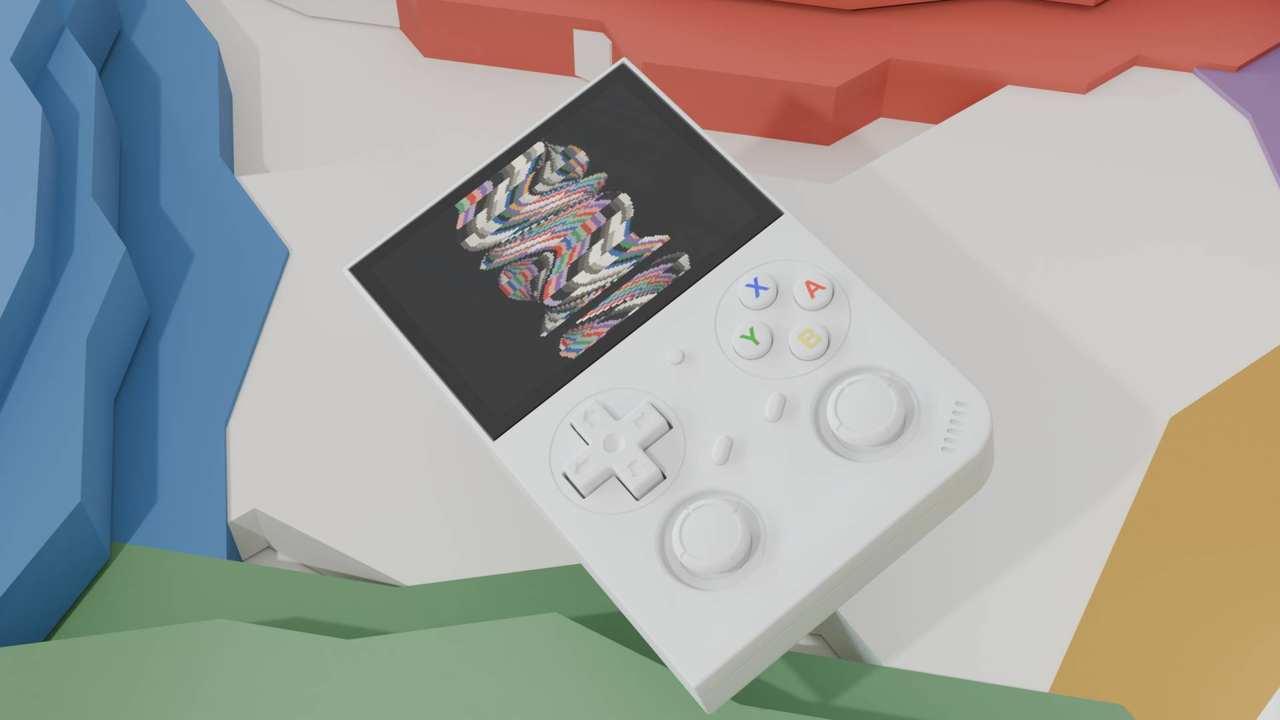
Handheld Blender concept render · Design illustration
If you're used to a DAW, a tracker can look like a spreadsheet full of numbers. I want Contour to make that transition easier without losing the things that make trackers useful. By learning the controls and commands in Contour, you'll also build the skills to explore other trackers.
Song, Chain, Roll and Phrase show the music at different levels. You can build a short idea, reuse it and see how it fits into an arrangement.
The tracker still uses notes, effect commands and hexadecimal values. The aim is to show what those values are changing, so you can learn as you go rather than memorise a command list before you start.
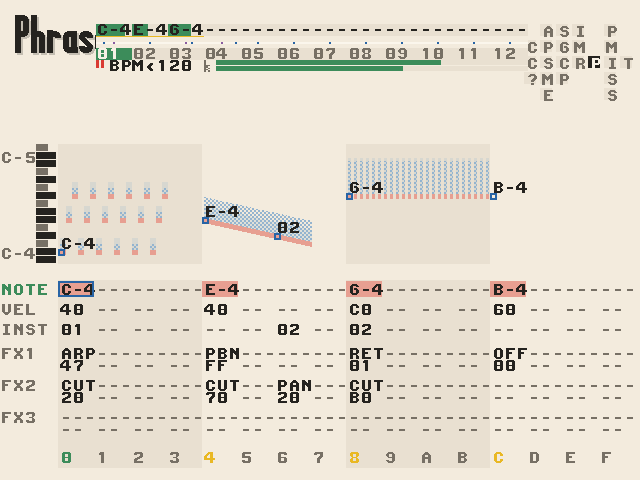
In Contour, the tracker tells an instrument what note to play and what to do with it. The instrument determines the sound. That might be a single sample, a sliced break, a drum kit or one of the synthesizer engines.
Map a recording across notes, divide a break into slices or build a kit from separate hits. Other instrument layouts are being developed for round-robin and multi sample work.
Set start, end and loop points; crop, reverse, fade and normalise. Slice and processing tools are being developed so you can prepare samples without leaving the tracker.
Pick an instrument in a phrase, enter notes and use tracker commands to change how it plays. Instruments can also use effects sends and modulation where supported.
Instrument types and editing tools will be listed in the release notes as they become available.
I like the approach Korg Gadget takes, with several instruments that are easy to recognise and quick to edit. Contour follows a similar idea with a cluster of characterful synth engines. Each has its own sound and a set of straightforward controls, making them easy to explore without sacrificing depth.
The planned range includes analogue-style synthesis, FM, phase distortion, wavetable methods and experimental engines. Each has a different set of strengths.
Each engine has a smaller set of useful parameters, with a consistent way to edit them from the tracker.
Using the Parameter Matrix and Tables, Contour's tracker workflow can open up all sorts of possibilities for modulation and sound design with a simple synth.
The synth engines are still being developed. I'll list what's working in each release.
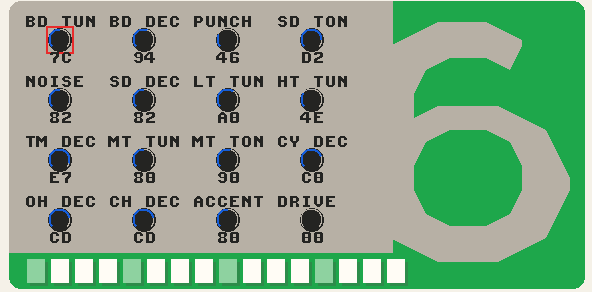
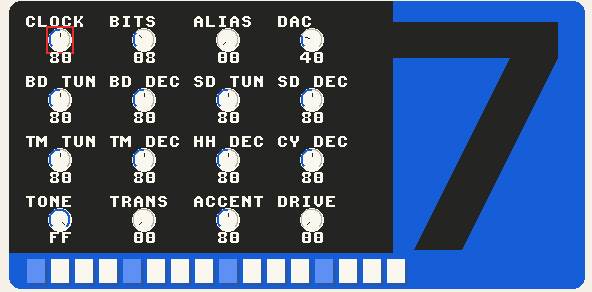
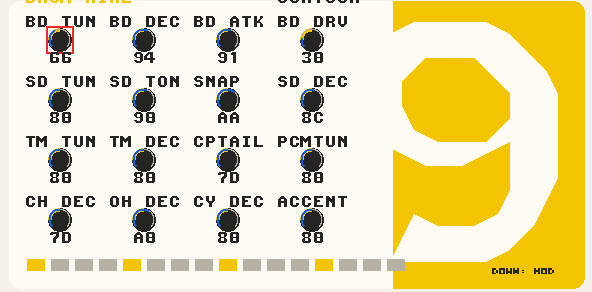
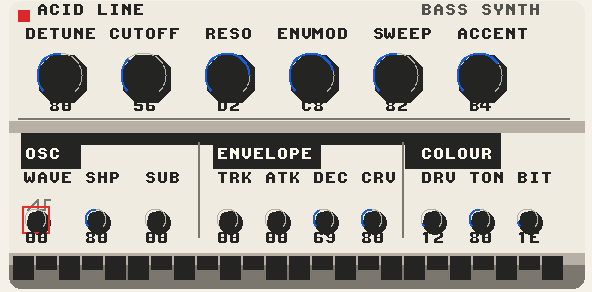
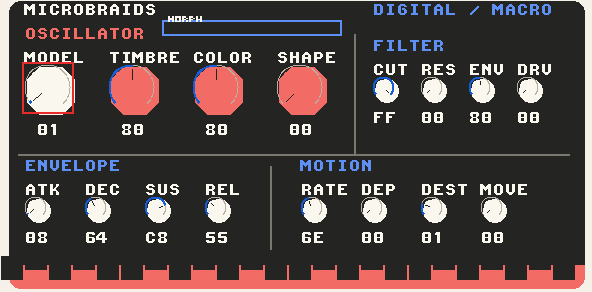
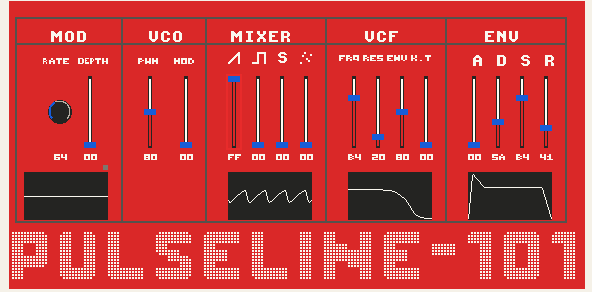
Instrument panels rendered by Contour. Controls and artwork may change during development.
There are times when I want to write every note, and times when I want a useful starting point. Contour includes tools I'm developing for chords, scales, grooves, pattern variations, samples and procedural artwork.
Generate chord progressions, then adjust their complexity, spacing and voice leading.
Change a rhythm or pattern, listen to the result and keep the parts that work.
Generate tile-based artwork and graphic details for the visual scenes.
Coming from a background in visualisation and immersive technology, I've often wondered why there aren't more visual synthesizers on the market. We have powerful tools for generating graphics, but controlling them alongside music often means working across separate applications.
This was one of the main ideas behind Contour: bringing audio and visual synthesis into the same tracker workflow.
Something you can compose and perform alongside the music.
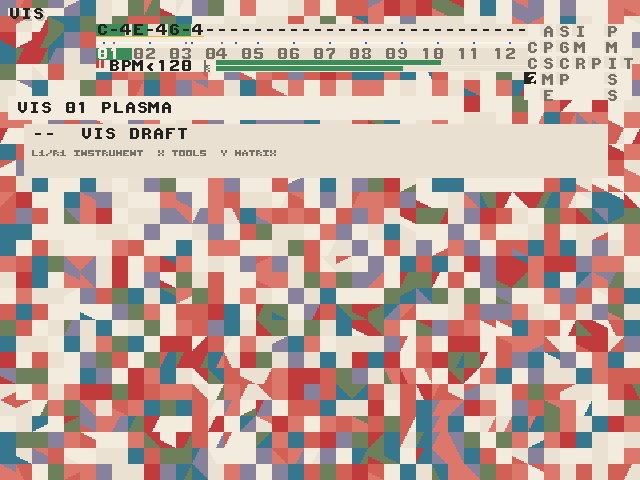
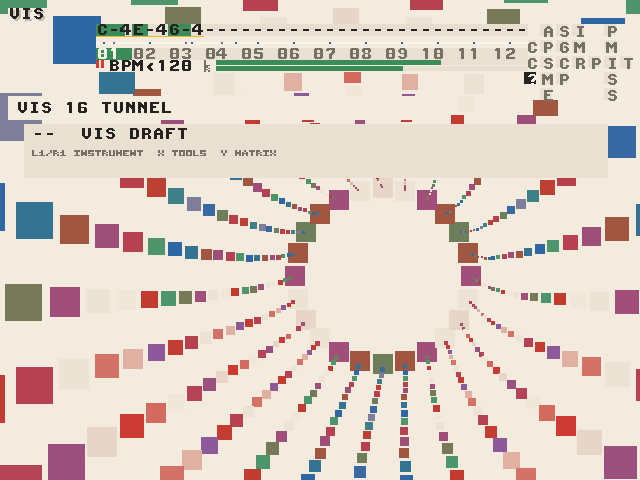
The visual system works much like the audio instruments. Choose an algorithm, adjust its parameters, then use the Parameter Matrix, tracker commands, Tables and modulators to route changes to different destinations and sequence how the visuals behave.
For example, a phrase could drive a tunnel, change the speed of a plasma effect or switch to a terrain scene at a particular point in the song. Multiple generators can be combined through the Compositor, much like layers in an arrangement.
SONG / CHAIN / PHRASE
         │
  NOTE + FX + MACRO
         │
    VISUAL PARAMS
         │
  TUNNEL / PLASMA
  TERRAIN / GLYPHS
         │
     COMPOSITOR
         │
      DISPLAY
Planned workflow diagram. Individual controls and mappings may change during development.
Not everything needs to be generated by an algorithm. Contour also includes an Art Canvas for drawing and creating custom artwork using its expanded CONTSCII glyph library.
These graphics can be used for visuals, patterns and artworks for your projects and beyond.
Looking further ahead, I'd also like to explore a simple 3D modeller for creating custom geometry and assets that can be brought into the visual synthesizer. The idea is to give people more ways to create their own visuals without having to leave Contour.
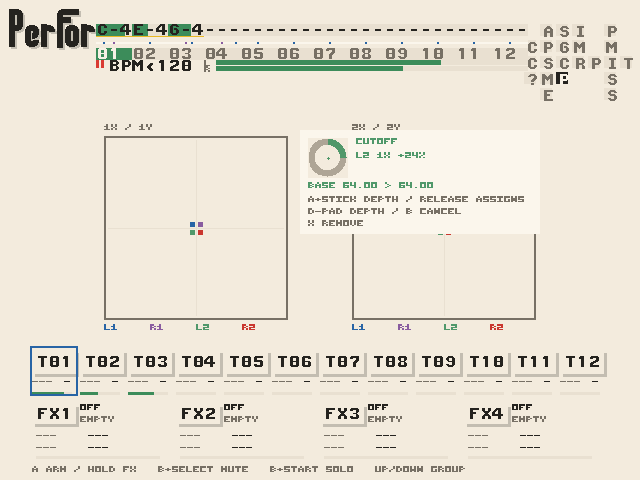
I want Contour to be useful for playing live. The idea is to control an arrangement, change sounds and effects, and run visuals from the same device. Something you could take to a rave or demoparty!
Move through song sections and vary patterns while the music is playing.
Use macros and effects to change sounds without leaving the performance.
Sequence visuals, with layers for combining them.
Bring your Contour devices together, take turns with music and visuals and contribute to a shared performance.
MUSIC.
VISUALS.
ONE DEVICE.
I've always appreciated the Australian demoscene and chiptune communities, particularly how musicians, visual artists and enthusiasts come together to share their enthusiasm. I wanted to build something that encouraged that same collaboration, where people could bring their Contour devices, perform music, take turns controlling visuals and contribute to a shared experience.
And that leads into the idea behind Contour: being able to share those creations with other people.
CONT brings Contour's music, graphics and sharing tools together. The expanded CONTSCII library builds on the idea of PETSCII, providing glyphs for artwork, patterns and visual synthesis.
ASCII (American Standard Code for Information Interchange) gave computers a standard way to represent and exchange text. Commodore's PETSCII (PET Standard Code of Information Interchange) expanded on this with graphical characters that became an important part of early computer art.
CONTSCII pays homage to that history, building on the idea of a shared character set for creating artwork, patterns and visuals within Contour.
With editable themes and a custom creator identity, you can make Contour your own. Personalise how it looks, create your own artwork and give your music an identity that stays with it when shared.
One of the longer-term ideas is StreetPass-style sharing. Two Contour devices could discover each other and exchange projects, instruments, presets or artwork, without requiring a central server for every transfer.
I'd also like files to retain creator details, contributions and remix history, so people can see where an idea came from and how it has developed as it's passed between users. This part of Contour is still experimental.
CONTSCII and theme tools are evolving. Device-to-device sharing is still in development.
CONT ❤️ OUR
CONTSCII · THEMES · SONGS · ART · SHARE
I'm testing Contour on the Anbernic RG35XX Pro, RG35XX H and RG34XXSP. The handheld work is focused on the Allwinner H700 chipset. I'm developing a Windows version as well. Future plans include Linux and Mac when I have the hardware to test them.
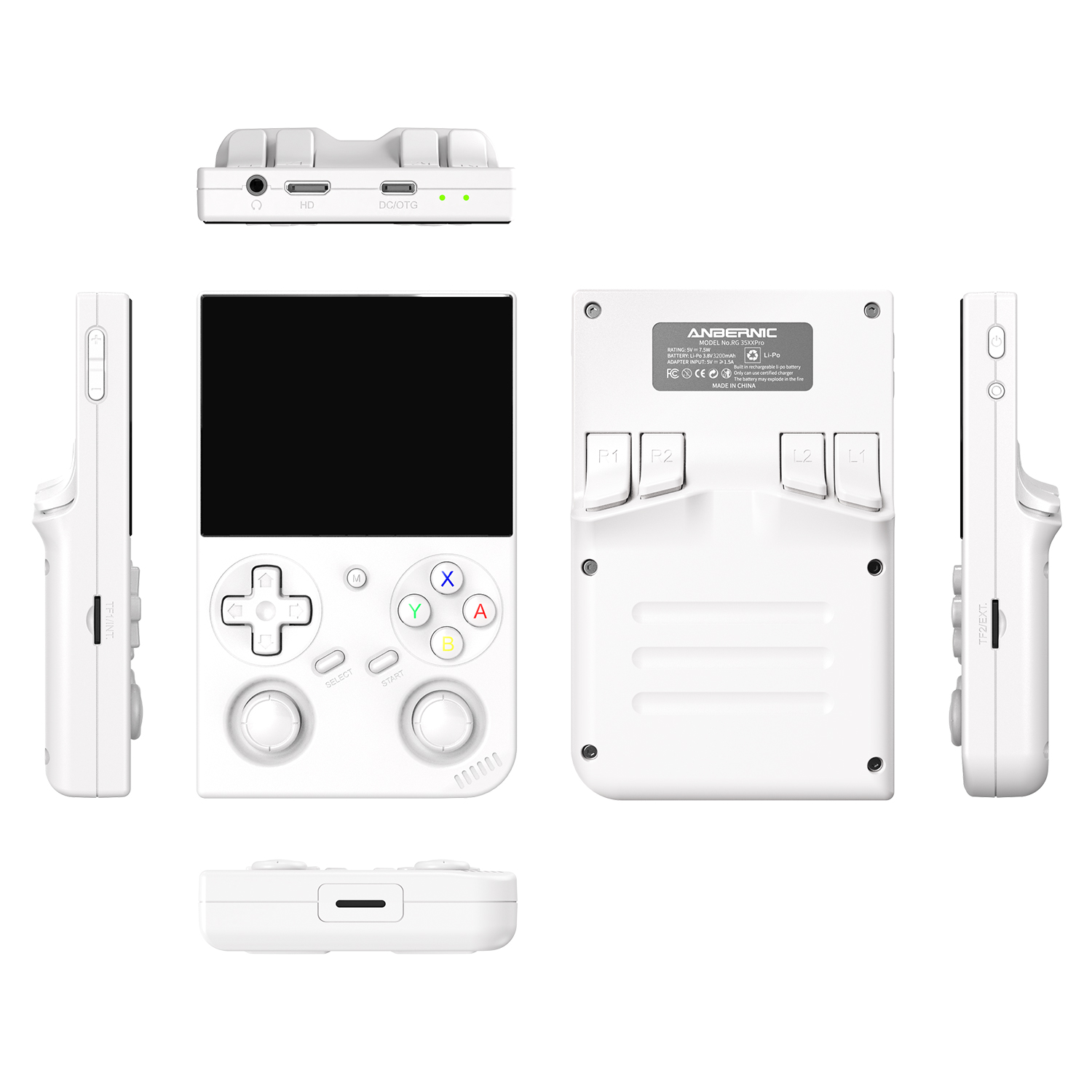
Vertical layout, closer to the original Game Boy format.
View on Anbernic ↗
Clamshell layout, similar in spirit to the Game Boy Advance SP.
View on Anbernic ↗
Horizontal layout with a different arrangement of controls.
View on Anbernic ↗
For PC, this is what I'm using: the blue G Classic 8BitDo Pro 3. I like the GameCube. Don't judge.
I'll be adding a controller input manager soon, so you can configure your controls in Contour.
View 8BitDo Pro 3 ↗Affiliate disclosure: I've set up Anbernic affiliate links, with any commission going into the Contour war chest. If you purchase through them, I may receive a commission at no additional cost to you. Please check Contour's release notes before buying a device specifically to run it. Browse the Anbernic store ↗
I'm aiming to move from alpha to beta around the middle of 2027, with a first release towards the end of that year. Those dates may change if the software needs more work.
Working on the tracker, instruments, samples, visual systems and control layouts, with testing on H700 devices and Windows. There are several more systems to develop and UX details to tweak before it becomes a good experience.
Fixing problems, improving performance and creating content for my YouTube channel with development updates and tutorials.
The target is to have enough of the main workflow working reliably for broader testing and feedback.
A first release with installation steps, supported-device notes and documentation. Although I'll be releasing builds throughout development, the goal is for this to be the official v1.
Beyond that, I want to keep building Contour and make a tool for people to enjoy.
After my hiatus from YouTube and an interstate move, I've settled into Melbourne and feel like I've finally got the energy to start creating again.
I've built a new overhead filming rig and I'm almost finished setting up my studio. I still have my M8 tutorial series to finish, but I'm looking forward to getting back into making videos.
Alongside the remaining M8 tutorials, I'll be making videos about Contour, covering its development, tracker workflows, synthesizers and visual tools. I'll also be sharing what's working, what isn't and what I'm learning along the way.
Contour videos will be coming soon!
I'm planning a walkthrough before the new year: a tour of Contour while making a track, so you can get a sense of how it works. I've got Blender ready for the intro.
Like my Polyend Tracker and M8 tutorials, I'll be making a multi-part deep dive from the basics through to advanced features. Planned for 2027.
Making cool tunes, experimenting with the visual synthesizer and seeing what I can put together for live performances. I hope it encourages people to make their own.
I got into making electronic music with LSDj on a Game Boy. That little machine gave me a way to write music and learn how sequencing and synthesis worked.
Contour comes from that experience. I want to make something you can pick up, explore and learn as you go. You still have the notes, numbers and commands of a tracker, but you can see more of what they're doing.
I also want the visuals to be part of making the track. Sequence them, play with them and bring them into a performance. Take a little music and visuals setup with you wherever you go.
— Aisjam
I STARTED
WITH LSDj
AND A
GAME BOY.
Contour is free, and I intend to keep it that way.
Game Boys have become expensive, especially when you consider the cost of getting everything together to run LSDj. Affordable retro handhelds like the Anbernics have made it possible to experience LSDj and other music software without having to track down original hardware.
Having spent years making synthesizer tutorials on YouTube, I've also seen how expensive getting into electronic music can be. The cost can quickly become a barrier for someone who is just starting out and wants to have a go.
Contour is my attempt to make music creation more accessible. Something you can put on an affordable handheld, take with you and enjoy making music wherever you are.
The Anbernic hardware links above are affiliate links. If you purchase through them, I may receive a small commission at no additional cost to you. It's one way to help support Contour's development.
I'm also planning to release optional synthesizer, sample and visual packs through my Gumroad store in the near future. These will provide additional sounds and creative material for people who want them, while helping me cover the time and costs involved in developing Contour.
The idea is to keep the tracker free and make supporting the project optional. I want people to be able to get into making music without having to spend a fortune before they've even started.
I'm designing Contour's workflow, instruments and visual identity around a handheld. It brings together my own ideas, the tools I enjoy using and work that other people have shared.
LSDj and ProTracker are big influences, alongside M8, Polyend Tracker and Korg Gadget. The Game Boy Camera and Nintendo 3DS also feed into the playful side of it, especially making things and sharing them between devices.
Contour also builds on other people's work, and I want to give that work proper credit. Its reverb adapts Freeverb by Jezar at Dreampoint. MacroBraids and PolyBraids use the Mutable Instruments Braids engine by Emilie Gillet, with supporting code from stmlib.
SDL handles the window, graphics, controls and audio connection. Other libraries, including SDL_net, Monocypher and Mbed TLS, support networking and creator identity. The project's credits and source notices document those contributions.
I use AI programming tools to help with implementation, debugging, review and optimisation. I'm used to writing code in Unity, and AI has helped me translate that way of working, along with code and formulas, into C++ and SDL3. I make the design decisions, choose what goes into Contour and take responsibility for testing it. There's still plenty to build, test and improve, and I'll keep sharing that process as it develops.
Contour is an independent project and is not affiliated with the companies or creators mentioned here. Third-party code and dependencies retain their respective licence and attribution requirements.
I'll keep the release notes in CHANGELOG.md ↗ and show the version entries below from versions.json. The first alpha was released at Syntax ’26 Demoparty.
Released 14 November 2026 at Syntax ’26 Demoparty. Expect bugs and incomplete systems; song files may change before beta.
I plan to release Contour for free. Later, I may offer optional sample packs, presets and supporter options to help pay for development. The main tracker won't need a subscription. Check GitHub Releases for builds when they're ready.